HTML Artifact
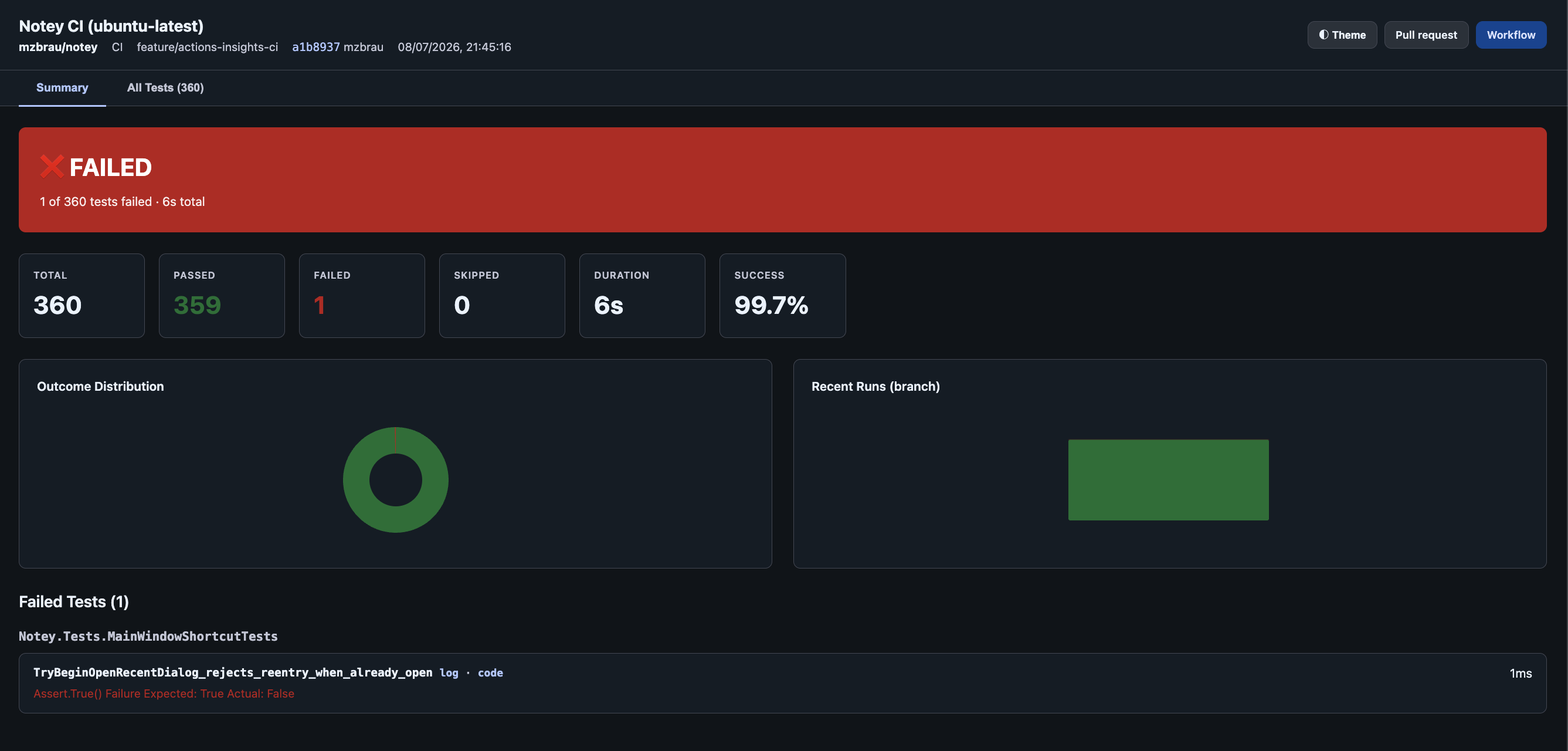
Actions Insights generates a standalone, responsive, interactive HTML report and uploads it as a workflow artifact. The report mirrors the history dashboard’s single-run view (Summary, All Tests, Test Coverage, and Build tabs when data is available) and embeds test trends, coverage, and build details so it opens in the browser without sidecar files.
When to Enable
Enable the HTML artifact when you need:
- Deep investigation beyond what fits in a PR comment
- Offline review of test results (self-contained HTML — no
trends.jsonrequired) - Per-branch test history across workflow runs
- Sharing reports with stakeholders who do not have PR access
Configuration
HTML artifact upload is enabled by default (upload-html-report: true).
- uses: mzbrau/actions-insights@v1
  with:
    test-results: '**/*.{trx,xml,json}'
    upload-html-report: true
    include-raw-test-results: true
    artifact-retention-days: 30
    history: 20
    retain-days: 30
    theme: auto
To disable raw file bundling:
with:
  include-raw-test-results: false
To disable:
with:
  upload-html-report: false
Accessing the Report
PR comments, the workflow job summary, and the artifact-url output link directly to the unzipped HTML artifact. Click Report to open the interactive report in your browser (GitHub login required).
Each run uploads two artifacts:
| Artifact | Format | Contents |
|---|---|---|
actions-insights-report-{commit-sha}.html | Unzipped HTML | Self-contained interactive report (opens in browser) |
actions-insights-report-{commit-sha} | Zip | report.html, trends.json, and optional raw/ files |
The unzipped HTML embeds run data, trends, coverage, and build diagnostics/timing. Opening the Report link shows the full interactive report with no extra download.
To download files for offline use:
- Open the workflow run on GitHub
- Scroll to Artifacts
- Download either artifact above
Report tabs
| Tab | Contents |
|---|---|
| Summary | KPIs, outcome distribution, coverage bars, failed tests (with Instructions for an AI agent prompt and per-test name copy), slow tests |
| All Tests | Searchable/filterable test list with per-test history from embedded trends and copy-full-name buttons |
| Test Coverage | Shown when coverage is present — project → file → method drill-down |
| Build | Shown when diagnostics and/or workflow timing are present |
Artifact Contents (zipped bundle)
| Path | Description |
|---|---|
report.html | Interactive HTML report (same self-contained file as the unzipped artifact) |
trends.json | Sidecar copy of branch history and per-test trends (also embedded in the HTML) |
raw/ | Original test result files from the workflow |
raw/manifest.json | Index of raw files with source paths and parse status |
The artifact also includes a raw/ folder with the original test result files (TRX, XML, JSON, etc.) that matched your test-results glob, plus raw/manifest.json mapping artifact paths back to the workspace paths. Use these when you need the unprocessed output.
History Across Runs
Report history is preserved via Actions cache. Each run merges into the cached site tree, prunes old runs per history and retain-days, and re-uploads the complete site.
For persistent, org-wide history across repositories, see History Repository.
Key Inputs
| Input | Default | Description |
|---|---|---|
upload-html-report | true | Upload HTML report artifact |
include-raw-test-results | true | Include original test result files under raw/ in the artifact |
artifact-retention-days | 30 | Artifact retention on GitHub |
history | 20 | Max historical runs per branch/PR |
retain-days | 30 | Max age for historical runs |
theme | auto | light, dark, or auto |